| Tables Are Complicated | |||
|---|---|---|---|
| Mohammadbishr Hafiy |  |
||
| 22 | 13 November 1993 | ||
| HafiyXXX@gmail.com | +673 XXXXXXX |  |
|
| HND | Class A |  |
|
| A male Scorpio. |  |
||
 |
|||
Tuesday, April 12, 2016
WDP Ex4 - Tables Are Complicated

WDP Ex3 - Tables and Span
Monday, April 11, 2016
WDP Ex2
List of my favourite things
- Raindrops on roses
- Whiskers on kitten
- Brigh copper kettles
- Worm woolen mittens
List of things I find just OK
- White chocolate
- Khairun Akandi
- My wallet right now.
Most annoying TV celebraties
- Song Jongki
- Kim JongKook
- Meghan Trainor
- The Kardashians
- Miley Cyrus
Top Three things i can do today
- Think about the possible problems I can cause to someone.
- Watch the problems i created take place.
- Worry about the victims future.
Description List
- Coffee
- - black hot drink
- Milk
- - White cold drink
Nested List
- Dad's Interests
- football
- knitting
- Mom's interests
- hating football
- skydiving
- Favourite boys' name
- Ryan
- Mohammad
- Azim
- Favourite Girls' name
- Aqilah
- Siti Sarah
- Melissa
First font Size change
Some texts for your to make tiny!
Some texts for you to make normal size!
Some texts for you to make super big!
Changing the colors!
Big Heading
A giant bear & a little duck were friends.
But the bear got hungry and ate the duck.
- This item is big Arial
- This item is medium verdana
- This item is small impact
Set background color
Favourite Footbal Teams ¾
- The Hawthorn Football Club
- San Francisco 49 ers
- Barcelona FC

Wednesday, April 6, 2016
Lab Exercise 1: PC Network TCP/IP Configuration
Step 1 Connect into the Internet
Establish and verify connectivity to the
Internet. This ensures the computer has an IP address.
Step 2 Gather TCP/IP configuration
information
Use the Start
menu to open the Command Prompt, an MS-DOS-like window. Press Start, then type cmd for Command Prompt.
The following figure shows the Command screen.
Type ipconfig
and press the Enter key. The spelling of ipconfig is critical while case is
not. It is short for IP Configuration.
Step 3 Record the
following TCP/IP information for this computer
IP address: 192.168.11.64
Subnet Mask: 255.255.255.0
Default
Gateway: 192.168.11.1
Step 4 Compare the TCP/IP configuration
of this computer to others on the LAN
If this
computer is on a LAN, compare the information of several machines. (Maximum of
3)
Are there any
similarities? Yes.
What is
similar about the IP addresses? The three have the same default gateway and subnet mask.
What is
similar about the default gateways? Default gateway is the same for all three machine.
The IP
addresses should share the same network portion. All machines in the LAN should
share the same default gateway.
Record a
couple of the IP Addresses:
192.168.11.65 & 192.168.11.67.
Step 5 Check additional TCP/IP
configuration information
To see
detailed information, type ipconfig /all and press Enter.
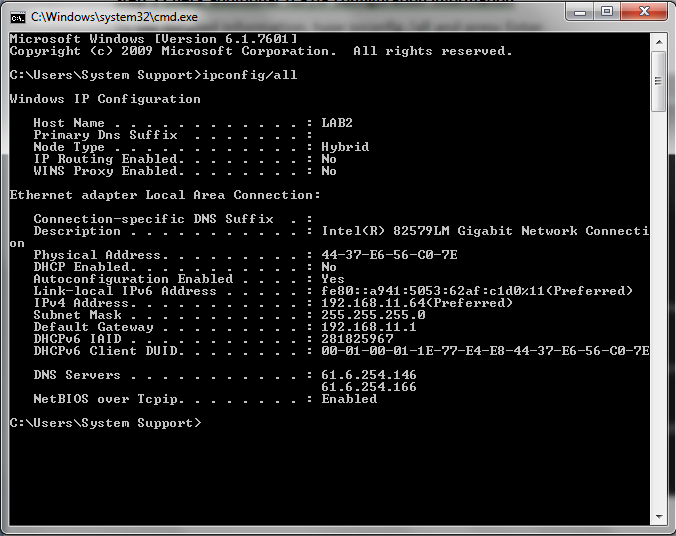
Notice the
Physical Address (MAC) and the NIC model (Description).
In the LAN,
what similarities about the Physical (MAC) Addresses are seen?
There were no similarities found between the compared machines Physical Addresses
While not a
requirement, most LAN administrators try to standardize components like NICs.
Therefore, it
would not be surprising to find all machines share the first three Hex pairs in
the adapter address. These three pairs identify the manufacturer of the
adapter.
Write down
the IP addresses of any servers listed:
61.6.254.146 & 61.6.254.166
Write down
the computer Host Name:
LAB2.
Write down
the Host Names of a couple other computers:
All three compared machines have the same Host NameLAB2
Do all of the
servers and workstations share the same network portion of the IP address as
the student workstation? No
It would not be unusual for some or all of the
servers and workstations to be in another network. It means that the computer
default gateway is going to forward requests to the other network.
Step 6 Close the screen
Close the
screen when finished examining network settings.
Reflection
Based on
observations, what can be deduced about the following results taken from three
computers connected to one switch?
Computer 1
IP Address:
192.168.12.113
Subnet Mask:
255.255.255.0
Default
Gateway: 192.168.12.1
Computer 2
IP Address:
192.168.12.205
Subnet Mask:
255.255.255.0
Default
Gateway: 192.168.12.1
Computer 3
IP Address:
192.168.112.97
Subnet Mask:
255.255.255.0
Default
Gateway: 192.168.12.1
Should they be able to talk to each other? Are
they all on the same network? Why or why not? If something is wrong, what is
most likely the problem?
Answer:
The three computers should not be able to talk to each other because Computer 3 have a different IP Address, Computers 1 and 2 are on the same network but Computer 3 is not. this is shown in their IP Address that Computer 1 and 2 have 192.168.12... as their IP Address while Computer 3 have 192.168.112...so Computer 3 should change its's IP Address to be the same as the other. If done, this allows the three to communicate with each other, in a sense that they could share files and information with each other. If somethings is wrong, it could be that between the three, one would have a different IP Address.
Tuesday, April 5, 2016
Computer Network - 06 April 2016
Importance of Computer Network
- Share hardware
- Sharing information and files between users
- Allows users to communicate through e-mail, video conferencing, etc between organisations
Ping vs Traceroute
PING stands Packet InterNet Groper, is a utility used to verify whether or not a network data packet is capable of being distributed to an address without errors. The ping utility is commonly used to check for network errors.
Traceroute a procedure allows you to find out precisely how a data transmission traveled from your computer to another. Essentially , the traceroute compiles a list of the computers on the network that are involved with a specific internet activity.
Number System
Binary Numeral System - Base-2
Binary numbers uses only 0 and 1 digits.
B denotes binary prefix.
Examples:
101012 = 10101B = 1×24+0×23+1×22+0×21+1×20 = 16+4+1= 21
101112 = 10111B = 1×24+0×23+1×22+1×21+1×20 = 16+4+2+1= 23
1000112 = 100011B = 1×25+0×24+0×23+0×22+1×21+1×20 =32+2+1= 35
101012 = 10101B = 1×24+0×23+1×22+0×21+1×20 = 16+4+1= 21
101112 = 10111B = 1×24+0×23+1×22+1×21+1×20 = 16+4+2+1= 23
1000112 = 100011B = 1×25+0×24+0×23+0×22+1×21+1×20 =32+2+1= 35
Decimal Numeral System - Base-10
Decimal numbers uses digits from 0..9.
These are the regular numbers that we use.
Example:
253810 = 2×10³+5×10²+3×101+8×100
253810 = 2×10³+5×10²+3×101+8×100
Hexadecimal Numeral System - Base-16
Hex numbers uses digits from 0..9 and A..F.
H denotes hex prefix.
Examples:
2816 = 28H = 2×161+8×160 = 40
2F16 = 2FH = 2×161+15×160 = 47
BC1216 = BC12H = 11×163+12×162+1×161+2×160= 48146
Numeral systems conversion table
| Decimal
Base-10
| Binary
Base-2
| Octal
Base-8
| Hexadecimal
Base-16
|
|---|---|---|---|
| 0 | 0 | 0 | 0 |
| 1 | 1 | 1 | 1 |
| 2 | 10 | 2 | 2 |
| 3 | 11 | 3 | 3 |
| 4 | 100 | 4 | 4 |
| 5 | 101 | 5 | 5 |
| 6 | 110 | 6 | 6 |
| 7 | 111 | 7 | 7 |
| 8 | 1000 | 10 | 8 |
| 9 | 1001 | 11 | 9 |
| 10 | 1010 | 12 | A |
| 11 | 1011 | 13 | B |
| 12 | 1100 | 14 | C |
| 13 | 1101 | 15 | D |
| 14 | 1110 | 16 | E |
| 15 | 1111 | 17 | F |
| 16 | 10000 | 20 | 10 |
| 17 | 10001 | 21 | 11 |
| 18 | 10010 | 22 | 12 |
| 19 | 10011 | 23 | 13 |
| 20 | 10100 | 24 | 14 |
| 21 | 10101 | 25 | 15 |
| 22 | 10110 | 26 | 16 |
| 23 | 10111 | 27 | 17 |
| 24 | 11000 | 30 | 18 |
| 25 | 11001 | 31 | 19 |
| 26 | 11010 | 32 | 1A |
| 27 | 11011 | 33 | 1B |
| 28 | 11100 | 34 | 1C |
| 29 | 11101 | 35 | 1D |
| 30 | 11110 | 36 | 1E |
| 31 | 11111 | 37 | 1F |
| 32 | 100000 | 40 | 20 |
References:
- http://computer.atlas4e.com/Project_E1/chapter04/chapter04.htm
- http://yourbusiness.azcentral.com/importance-computer-networking-security-24299.html
- http://www.omnisecu.com/basic-networking/why-we-need-computer-network.php
- http://www.examiner.com/article/what-is-computer-network-and-why-is-it-important
- http://computer.atlas4e.com/Project_E1/chapter04/chapter04.htm
- http://www.webopedia.com/TERM/T/traceroute.html
- http://whatismyipaddress.com/traceroute
- http://searchnetworking.techtarget.com/definition/ping
- http://www.computerhope.com/jargon/p/ping.htm
- http://www.rapidtables.com/math/number/Numeral_system.htm
Monday, April 4, 2016
My profile
Mohammadbishr Hafiy bin Ariahim
I am 22 years old I currently live in Selayun, Sengkurong, Brunei Darussalam.
I am a Muslim male.
- Likes
- Likes to create trouble for others
- Likes Kpop and the Korean culture.
- Likes food and most types of desserts especially those of chocolate.
- Likes the color Blue.
- Interest
- Interested in good fantasy novels.
- Have an interest in writing fictions.
- Interested in traveling around the world, particularly S.Korea.
- Interested to learn other languages besides English and Malay in depths.
- Dislikes
- Dislikes being interrupted when eating.
- Dislikes heavy-duty work
- Not liking chocolate that are not BROWN , darker chocolates are better.
- Dislikes trouble
- Favourite celebrities
- After School, Korean idols group
- Jennifer Lawrence
- So Ji Sub
- Super Junior
Subscribe to:
Posts (Atom)